Gather 1.0 Conference Space Settings
Last updated: May 29, 2026
This article will explain all available settings for Gather 1.0 Conference Spaces. To learn more about Gather 1.0 Office Space settings, click here.
To change space settings, you must be an Admin. Learn more about User Roles and Permissions.
To open space settings
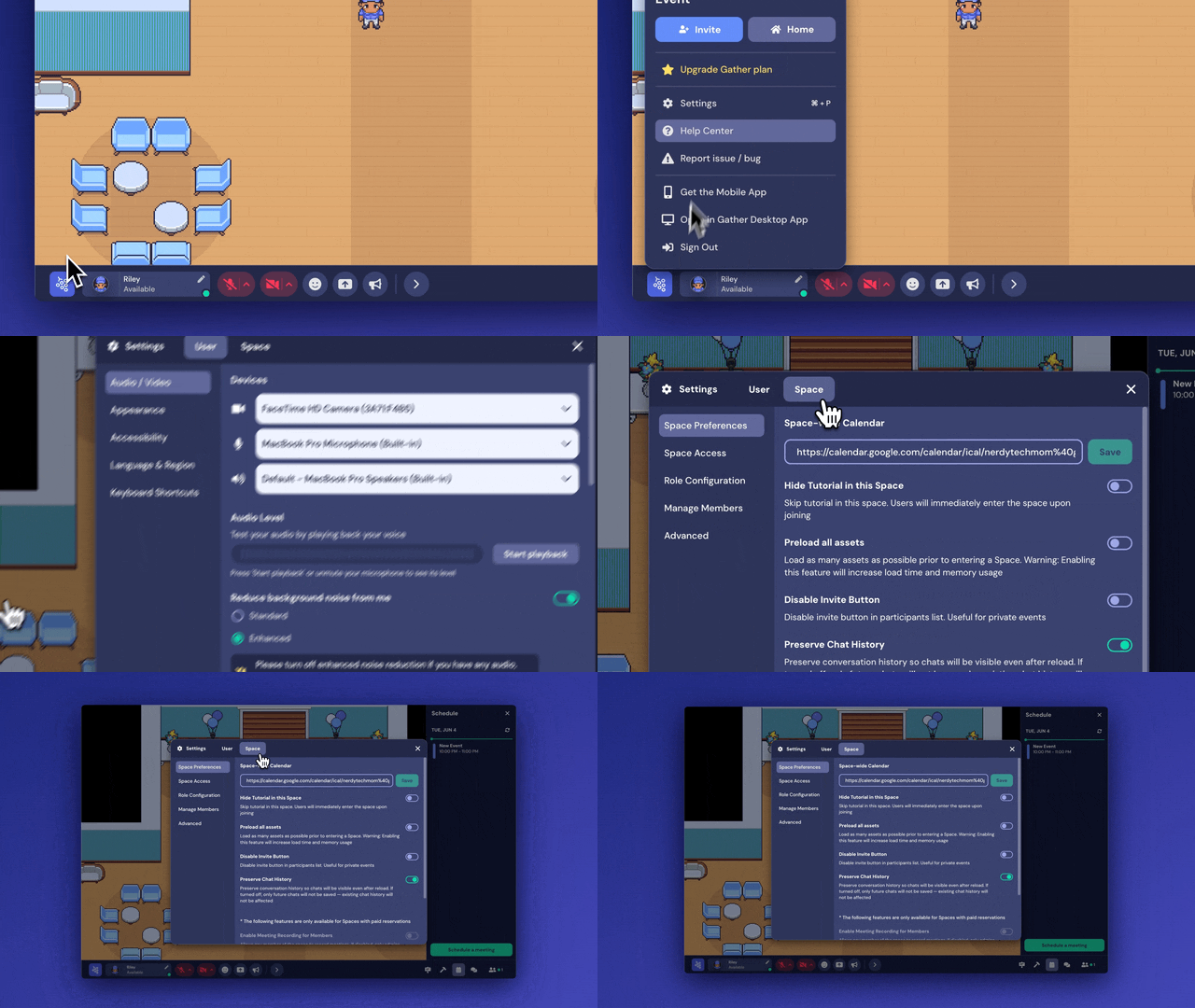
Click the Main Menu button in the bottom navigation bar (with the Gather logo)
Click Settings
Click Space at the top
Space Preferences
Space-Wide Calendar
Add a space-wide calendar to sync events across the space. The space calendar is integrated through an iCal link and must be set as "public" to be added to the space.
You can add new calendar events with Custom Spawn Tile location links if you:
Have an Admin, Mod, Builder, or Member user role
Have permission in the calendar application you are using to add events.
Hide Tutorial In This Space
When toggled on, users will skip the tutorial and enter the space immediately.
Preload All Assets
Load as many assets as possible prior to entering a Space.
Enabling this feature will increase load time and memory usage.
Disable Invite Button
When toggled on, the "Invite" button will not display in the Participants Panel. We recommend using this for private conferences and events.
Preserve Chat History
When toggled on, chat history will be visible upon reload or re-entry into the space. If turned off, future chat messages will not be saved. Existing chat history will not be affected.
Disable Chat (Premium Feature)
If you have an active reservation, you can choose whether to enable or disable chat for all users in the space.
Disable Screenshare (Premium Feature)
If you have an active reservation, you can choose whether to enable or disable screen sharing for all users in the space.
Learn more about Screen Sharing here.
Space Access
These settings help you manage who can access your space and how.
Space Password
Restrict access to your Conference with a password. To set a new password, type it in the field and click Save. To remove the password, click Remove.
There is currently no way to view the existing password.
Require Login
This requires guests entering your space to have a Gather account and be signed in.
Allow Staff Access
Occasionally, Gather staff may need to access your space to help you troubleshoot an issue. Toggle on Allow Gather Staff Access so we can enter without needing your password or being a Member.
Email Domain Access (Premium Feature)
If you have an active reservation, you can restrict access to users logged in with specific domains.
Role Configuration
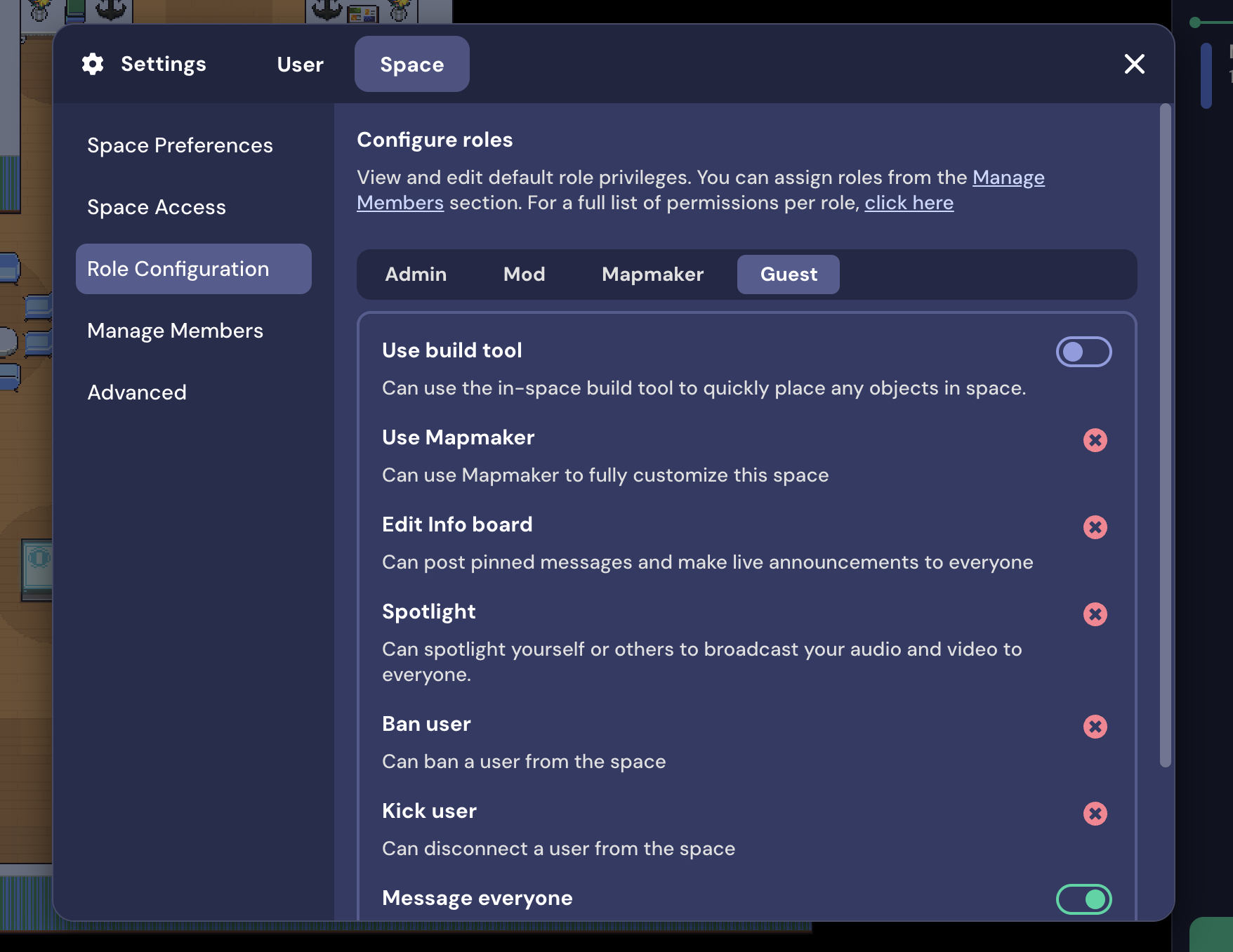
These settings allow you to customize certain features by user role. For example, some events like to give all Guests access to the Build Tool. Others like to limit this feature to Admins, Moderators, and Mapmakers.
Manage Members
View all Members in your space and adjust their User Role.
Advanced
Customize Space
This button opens the Mapmaker, Gather 1.0's advanced customization tool.
Space Dashboard
The button opens the Space Dashboard, where you can manage your reservation and many of the same settings.
To submit a bug report or share feedback:
Open the Main Menu and select ‘Report issue / bug’
Or email support@gather.town