Host a Team Social or Activity
Last updated: July 7, 2026
Virtual happy hours and team get-togethers are a great way to foster meaningful work relationships. They provide a platform for team members to connect on a personal level beyond formal work discussions, helping break down silos and build stronger cohesion and camaraderie.
This guide will help you get started and offer ideas to host an engaging event that brings your team together!
Requirements
A space on Gather. Click here to get started.
You'll need to purchase a subscription or reservation. Click here to read our Pricing Overview.
The space design recommendations in this guide will require Build Tool or Mapmaker access. Review our User Roles and Permissions to make sure you have the access you need.
Getting Started
Create a Remote Office space or use your existing Office on Gather.
You can use a Social/Lounge area that's built into your template or use the Mapmaker to customize a social area in the office.
Pƒurchase a subscription or reservation.
Plan team activities to hold during the social. Jump to this section for ideas.
Have fun! Enjoy the freedom of moving around, walking in and out of conversations, and strengthening relationships with your coworkers.
Ideas for Team Activities in Gather
As you're planning your team social, consider your team members' diverse preferences. Some might appreciate structured activities in smaller groups, while others might thrive with unstructured downtime.
We suggest a mix of both. Plan a team activity, but leave time at the beginning or end of the event for people to move around and talk to each other.
Race in the Gather Grand Prix
Hop on a go-kart and race each other around a short track to see who's the fastest in the office. Complete with obstacles to avoid, speedy power-ups, and a grandstand so extra teammates can watch the race.
If you're using an Office Template with a Lounge Room (usually located at the top of the map), you'll find the Rec Room inside, which will allow you to access the Grand Prix.
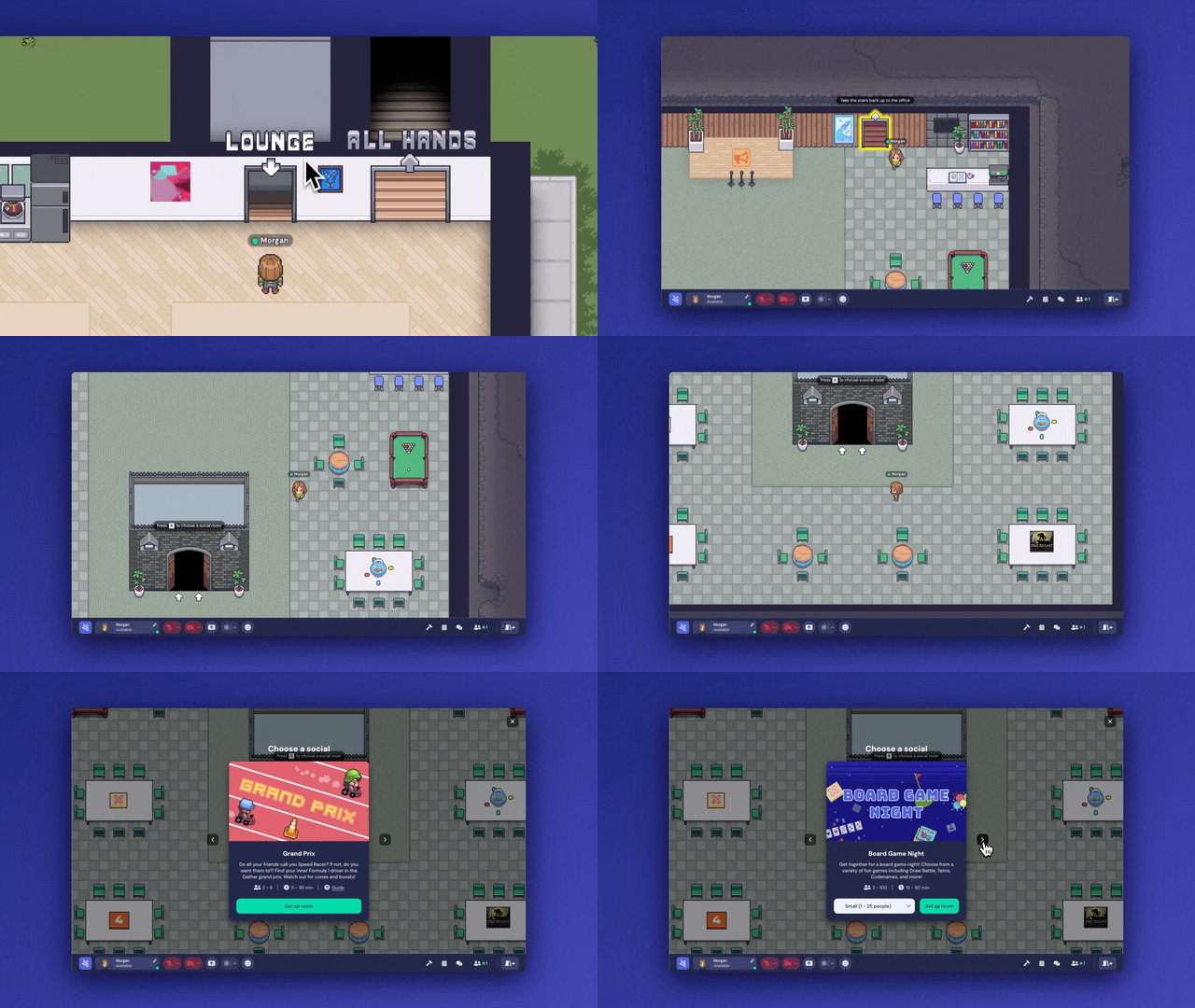
If your Office does not yet have a Lounge or the Rec Room, you can open the Object Picker from the Mapmaker and manually place a Rec Room in your office.
Take a break with embedded board games
Have some fun with digital group games. We have several built-in as objects that you can place with the Build Tool, such as Tetris, Codenames, and Draw Battle. You can view the full list of games here.
Have a different online game in mind? You can embed a URL in any object on Gather for quick access within the space.
If there's a Rec Room in your office, you can access Board Game Night: A board game experience where the games are already set up.
Organize icebreaker activities
One of the benefits of socializing in a virtual space on Gather is that it's really easy to bring your entire team together and then break off into smaller groups—all within the same space. (No jumping between meeting links or losing visibility of each other!)
This works great for activities where you split into groups or pair up for 1:1 conversations, then rejoin as a full group to share.
To run these activities, all you really need to do is tell people when/where they should be moving around and talking to others. You can either Spotlight yourself or stand on a Spotlight tile to address everyone at once.
If you want to customize your breakout rooms, you can use the Mapmaker to create dedicated Private Areas for specific groups/topics, and place labels with the Text Tool so people know what each area is for.
Host a desk decorating contest
We highly recommend this activity during your first week working in a Remote Office on Gather. It gives everyone a chance to personalize their desk, feel ownership over part of the space, and be creative together.
To decorate your desk, hover over it and click Customize. You can either limit the competition to the objects in the "My desk" tab, or if you want to get really creative, you can give your teammates Build Tool access, allowing them to place any object (or custom objects!) at their desk.
This guide provides more details about desks in Gather and is great to share with new teammates.
Ultimately, the success of your virtual team social relies on meaningful interactions. Encourage team members to share thoughts, experiences, and anecdotes. Whether they're discussing work or personal interests, these conversations help build stronger connections among your team.
Next steps
If you haven't created your space yet, click here to get started.
If you need to review our plans, view pricing here.
If you're ready to invite your team, review onboarding resources here.
To submit a bug report or share feedback:
Open the Main Menu and select ‘Report issue / bug’
Or email support@gather.town